
The Download tab of an SFTP connection defines the directory from which konfipay fetches transaction files and which files are taken into account in the process. The settings only take effect once the Enabled checkbox is ticked; if it is not ticked, the fields are greyed out and no retrievals take place.
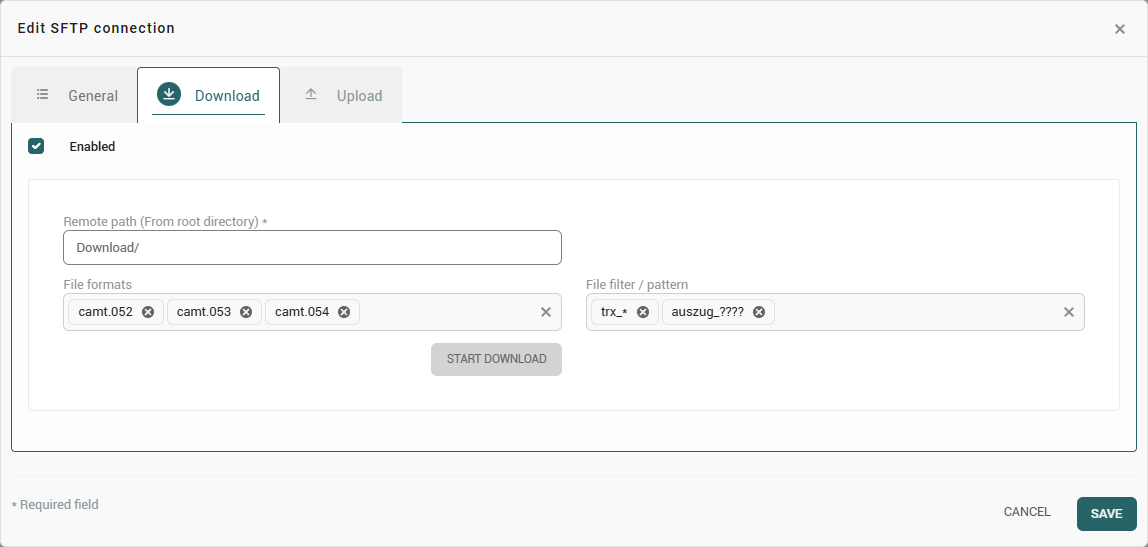
Settings
|
Field |
Meaning |
|---|---|
|
Remote path (From root directory) |
Directory on the SFTP server from which files are fetched. Exactly this directory is read; subdirectories are not searched. |
|
File formats |
Selection of the expected transaction formats: camt.052, camt.053, camt.054, MT940 and MT942. Several formats can be selected at the same time. |
|
File filter / pattern |
Determines which file names in the directory are taken into account. Several patterns can be entered; a file is fetched as soon as it matches one of the patterns. |
File filter and patterns
The patterns are entered freely and follow the customary notation with placeholders:
|
Placeholder |
Meaning |
Example |
|---|---|---|
|
|
Any number of characters within a directory name. |
|
|
|
Exactly one arbitrary character. |
|
|
|
Any number of characters including path separators. |
|
Upper and lower case are not distinguished. If no directory is specified in the pattern, it applies to the file names in the configured remote path.
Files with the extension .downloaded are always skipped. Some banks mark files that have already been fetched in this way if the access does not permit moving or deleting; without this exception, such files would be recognised as new again.
Processing of the fetched files
Fetched files are processed like regularly retrieved account statements: the transactions and balances they contain are evaluated and are then available in the account information. The following applies:
-
Each file is processed only once. If a file remains on the server, this does not lead to duplicate transactions.
-
If a file contains transactions for a bank account that does not yet exist in the client, the bank account is created and the balances are adopted.
-
If a file cannot be evaluated – for example because it is incomplete or does not correspond to the expected format – processing is repeated several times and is then not retried again, so that subsequent retrievals are not permanently blocked. The error messages are retained in the communication log.
Running the retrieval
The retrieval takes place in three ways:
-
Scheduled – konfipay retrieves at a fixed interval, every eight hours by default. The interval is adjusted in the administration area under Automation using the SFTP file download rule.
-
From within the connection – using
Start downloadin the Download tab of a connection that has already been saved. -
Via the transaction retrieval – under Account information > Fetch transactions in the SFTP tab. There, several connections can be selected and retrieved together using
Start download.
The Download ausführen permission is required for manual retrieval. The retrieval runs in the background; the result is displayed as a message and recorded in the communication log.
Typical messages
|
Message |
Meaning |
|---|---|
|
No files found on the SFTP server |
There are no files in the remote path that match the patterns. The path, the patterns and the upper and lower case of the expected file name should be checked. |
|
No new content available |
Files were found, but they had already been processed. |
|
Host key changed |
The server presented a different key than when the connection was first established. Once this has been clarified with the operator, the stored fingerprint can be reset in the connection (see Set up SFTP connection). |