
A FinTS/XS2A bank connection is connected via the secure web form of the bank (finAPI Web Form 2.0). Unlike with EBICS, no EBICS keys and no bank letter are needed – the login and the strong customer authentication (SCA) take place directly with the bank.
The prerequisite is that the FinTS/XS2A module is activated and the one-off finAPI setup has been carried out (see Setting up FinTS/XS2A).
Creating a bank connection
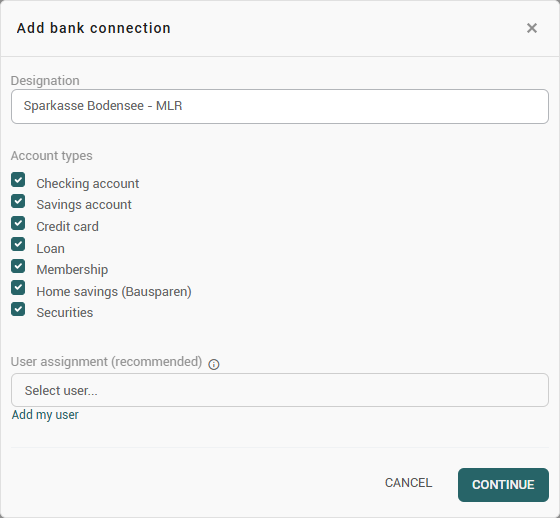
Master data > finTS/XS2A is opened on the left in the navigation bar and Add is clicked at the top of the toolbar. The Add bank connection dialog opens. The following is entered there:
-
Designation – a freely chosen name for the bank connection, under which it can later be found again in konfipay.
-
Account types – the choice of which kinds of accounts are to be imported. The available options are current account, savings account, credit card, loan, membership, building-society savings and securities. By default, all account types are selected.
-
User assignment – If you assign one or more konfipay users to a bank connection, only those users will be able to use that bank connection. If you do not assign any users, all users in your client will have access to that bank connection.
Then Continue is clicked.
Login in the bank's web form
konfipay now opens the finAPI web form of the bank (login with the bank). Depending on the configuration, it is displayed embedded directly in konfipay or called up in a separate step. The login takes place there with the online-banking credentials and the confirmation of the required strong customer authentication (e.g. by a TAN procedure).
Automatic import of the bank accounts
After a successful login, konfipay determines the bank accounts belonging to the bank connection and – in accordance with the selected account types – automatically creates them in the master data. The bank connection then appears in the list with the status Active. The connected accounts can be viewed via the toolbar function Bank accounts of the bank connection.
If a fresh login is required later for the bank connection, this is shown via the status Action required or Re-authentication required and the link Execute action (see the section page FinTS/XS2A (finAPI)).